
BIR Permit to Use (PTU) vs. CAS Acknowledgement Certificate (AC): Complete 2026 eAccReg & Form 1907 Guide
For Philippine business owners, CFOs, and retail operators transitioning away from manual carbon-copy receipts toward digital point-of-sale systems and cloud ERPs, navigating Bureau of Internal Revenue (BIR) accreditation can feel like a labyrinth. Two acronyms dominate almost every tax conversation: Permit to Use (PTU) and Acknowledgement Certificate (AC).
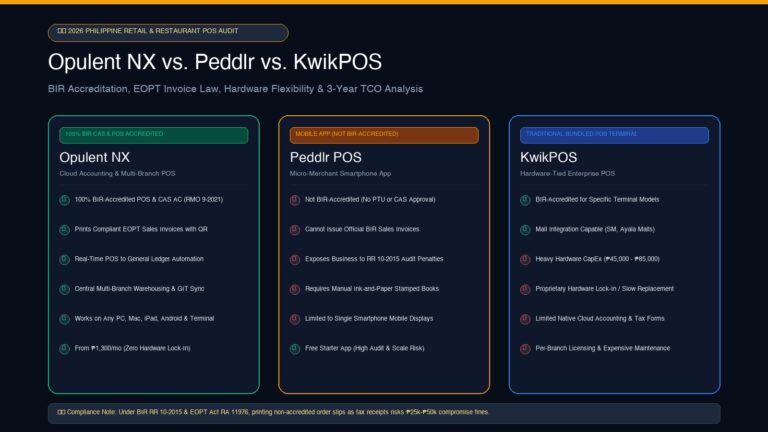
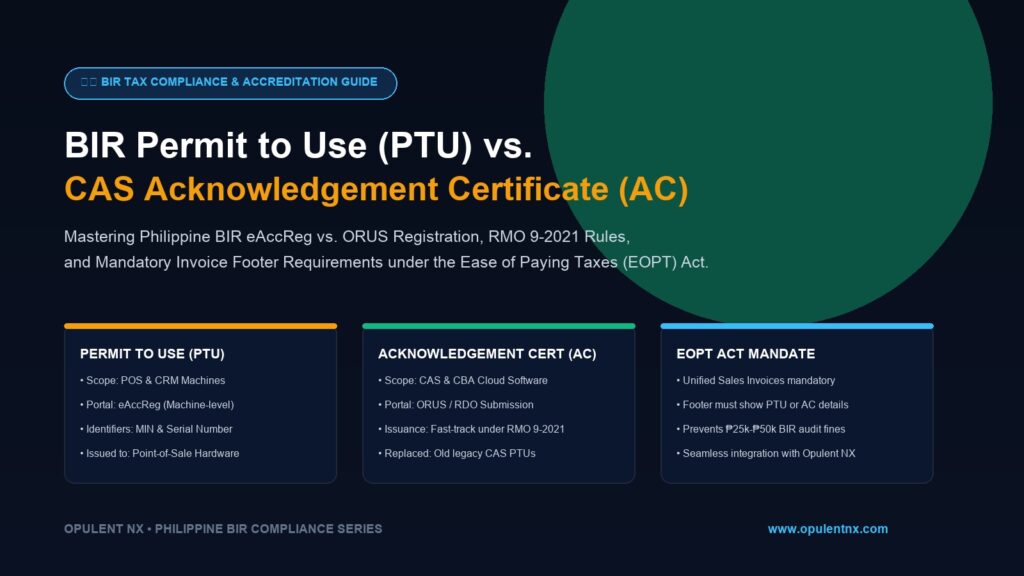
A widespread and costly misconception among retail merchants is treating these two certifications interchangeably. In reality, a PTU and an AC govern entirely separate layers of your technology infrastructure, require distinct BIR submission channels (eAccReg versus ORUS / RDO), and carry strictly regulated formatting requirements for your sales invoice footers under the Ease of Paying Taxes (EOPT) Act (Republic Act No. 11976). Operating sales hardware or digital accounting software with misattributed permits exposes your enterprise to mandatory BIR audit scrutiny and recurring deficiency penalties under the National Internal Revenue Code (NIRC).
1. Core Differences: Hardware-Level PTU vs. System-Wide CAS AC
To establish statutory tax compliance, you must first distinguish between front-of-house sales recording machines and complete back-office computerized accounting systems:
- Permit to Use (PTU): Governed historically under Revenue Regulations (RR) No. 11-2004 and RR No. 10-2020, the PTU is a terminal-level permit granted to physical Cash Register Machines (CRM), Point of Sale (POS) terminals, and Special Purpose Machines (SPM). It authorizes a specific physical terminal or registered cash register device to issue commercial invoices to customers. Each physical machine is tied to a distinct Machine Identification Number (MIN) registered inside the BIR’s eAccReg portal.
- Acknowledgement Certificate (AC): Introduced under the regulatory overhaul of Revenue Memorandum Order (RMO) No. 9-2021 and Revenue Memorandum Circular (RMC) No. 5-2021, the Acknowledgement Certificate formally replaced the old “CAS PTU” for all Computerized Accounting Systems (CAS), Computerized Books of Accounts (CBA), and electronic storage components. The AC certifies that your core accounting software, general ledger databases, and digital journal engines meet standard internal control and audit trail requirements.
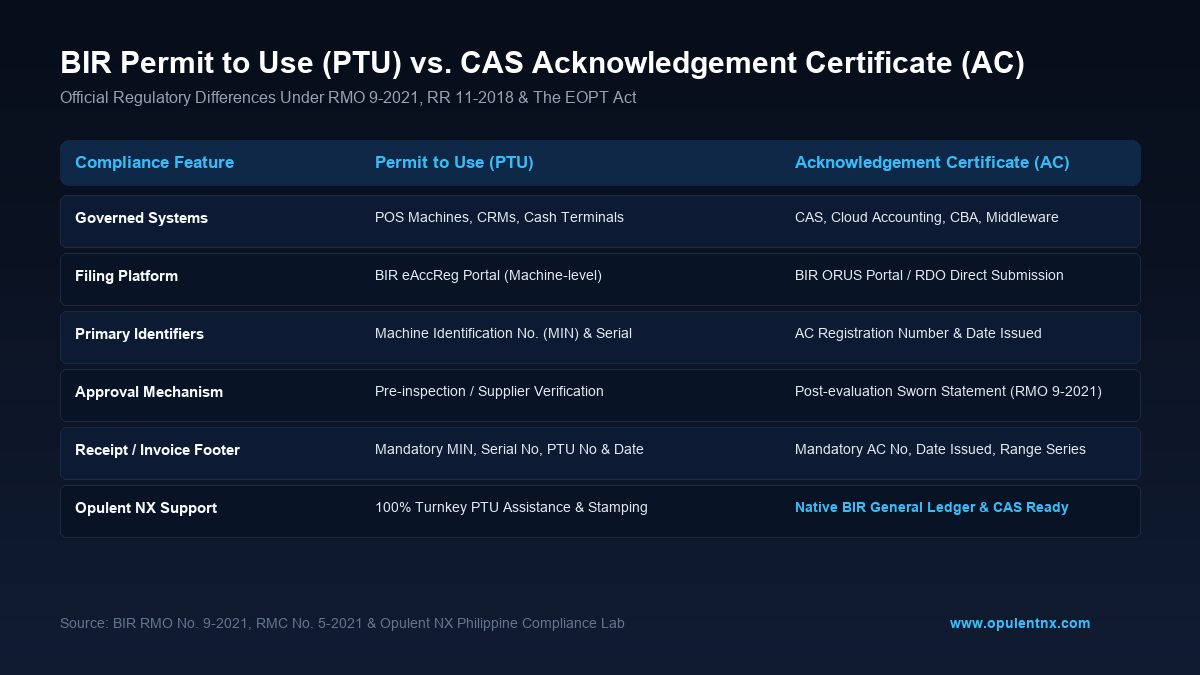
2. Head-to-Head Statutory Comparison Matrix
The following empirical matrix breaks down the statutory rules, filing channels, and operational scopes governing PTUs and ACs across Philippine commercial enterprises:
| Compliance Parameter | Permit to Use (PTU) | Acknowledgement Certificate (AC) |
|---|---|---|
| Governing Scope | Cash Register Machines (CRM), POS Hardware Terminals, Special Purpose Machines (SPM) | Computerized Accounting Systems (CAS), Cloud ERPs, Computerized Books of Accounts (CBA) |
| Primary Statutory Basis | RR 11-2004, RR 10-2020, NIRC Section 237 | RMO 9-2021, RMC 5-2021, RA 11032 (Ease of Doing Business) |
| Official Registration Portal | BIR eAccReg System (eaccreg.bir.gov.ph) | BIR ORUS System (orus.bir.gov.ph) / Revenue District Office (RDO) |
| Issuing Authority | Jurisdictional RDO / Large Taxpayers Office (via machine approval) | RDO Technical Working Group (TWG) / Large Taxpayers Assistance Division (LTAD) |
| Primary Identifiers Issued | Machine Identification Number (MIN) + Terminal Serial Number | System AC Number + System Date Registered + Series Control Range |
| System Demonstration Required? | Yes (Supplier machine testing or sample receipt generation) | Abolished under RMO 9-2021 (Replaced by Post-Audit Sworn Statement) |
| Statutory Processing Timeline | 5 to 15 business days depending on RDO machine inspection | Within 3 working days upon submission of complete documents |
| Mandatory Receipt / Invoice Footer | MIN, Serial No., PTU No., Date Issued, Valid Until (or Lifetime per EOPT) | AC No., Date Issued, Registered System Name, Version No., Approved Invoice Series |
3. Why RMO 9-2021 Abolished the CAS Permit to Use (PTU)
Prior to 2021, securing a “Permit to Use” for a Computerized Accounting System was notoriously complex. Businesses were subjected to rigorous pre-evaluation procedures, including mandatory live software demonstrations before a technical panel, code reviews, and months-long delays before a formal PTU was signed.
In response to the Ease of Doing Business and Efficient Government Service Delivery Act (RA 11032), the BIR issued RMO No. 9-2021, which completely overhauled CAS compliance:
- Abolition of Pre-Use Demos: Taxpayers are no longer required to conduct live system demonstrations before using their accounting software.
- The Sworn Statement Standard: In lieu of exhaustive pre-evaluations, taxpayers submit a formal Sworn Statement (Annex “C” or Joint Sworn Statement with the software vendor) attesting that the system complies with statutory record-keeping and audit trail requirements.
- Fast-Track Issuance: Revenue District Offices are mandated to issue the Acknowledgement Certificate (AC) within three (3) working days from the receipt of complete documentation.
- Shift to Post-Audit Scrutiny: Rather than verifying software before launch, the BIR conducts compliance reviews during regular tax examinations, auditing transaction integrity, general ledgers, and electronic books of accounts.
Note for Existing PTU Holders: If your company secured a formal CAS PTU prior to RMO 9-2021, that permit remains legally valid indefinitely—provided your system has not undergone major modifications or version upgrades that require re-registration under Annex “C-1”.
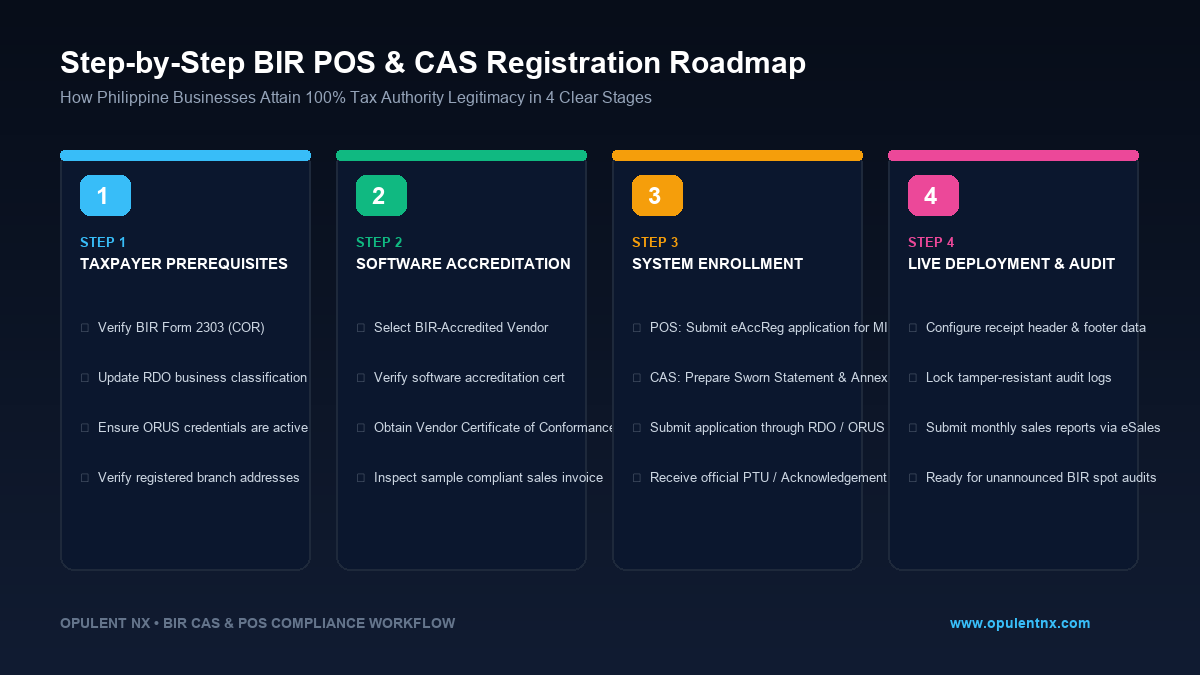
4. Step-by-Step BIR POS & CAS Registration Roadmap
To ensure your enterprise operates with ironclad statutory protection, follow this verified 4-stage registration workflow:
Stage 1: Taxpayer Prerequisites & Profile Alignment
Before initiating machine or software permits, your corporate tax records must be up to date:
- Inspect your BIR Certificate of Registration (Form 2303) to verify that your registered business address matches the exact physical location of the sales cashiers or cloud server deployment.
- Ensure your tax types include Value Added Tax (VAT) or Percentage Tax, and that your company profile is enrolled on the BIR ORUS Portal.
- Ensure all active books of accounts are registered, whether manual or computerized.
Stage 2: Select a BIR-Accredited Software Provider
Attempting to register non-accredited or foreign software packages without local statutory support creates massive friction. When choosing a solution like Opulent NX, your enterprise receives pre-certified compliance documentation:
- Certificate of Accreditation: Valid proof that the developer is accredited with the National Office.
- Standard Functional and Technical Requirements Matrix (Annex B): Documented proof of tamper-resistant audit trails, electronic sales journals, and immutable financial ledgers.
- Sample Sales Invoices: Formatted print outputs reflecting unified invoice fields under the EOPT Act (RR 7-2024 / RR 26-2025).
Stage 3: System Filing (eAccReg vs. ORUS / RDO)
- For Point of Sale (POS) Terminals: Your POS vendor or authorized representative logs into eAccReg to submit machine serial numbers, terminal counts, and software release versions. Once the RDO approves the machine, the system issues a Machine Identification Number (MIN), enabling you to print the physical Permit to Use (PTU) notice that must be visibly affixed to the cashier terminal.
- For Computerized Accounting Systems (CAS): File the application package through ORUS or directly at your RDO’s TWG desk. The submission includes the Sworn Statement (Annex “C”), System Description (Annex “C-1”), Functional Matrix (Annex “B”), and specimen printouts. The BIR issues your official Acknowledgement Certificate (AC) within 3 working days.
Stage 4: Receipt Footer Configuration & eSales Reporting
Once your PTU or AC is granted, your IT team must immediately configure your cashier print templates. Under Section 237 of the NIRC and EOPT regulations, omitting required registration identifiers results in an unaccredited receipt penalty of ₱20,000 to ₱50,000 per violation:
OPULENT RETAIL CORPORATION
7373 Bakawan St., Brgy. San Antonio, Makati City
VAT REG TIN: 000-123-456-00000 | MIN: 240101-000123456
PTU NO: PTU-1234-5678-2026 | DATE ISSUED: 01/15/2026
AC NO: AC-050-112026-000456 | DATE ISSUED: 01/18/2026
SERIES RANGE: 0000001 – 9999999
“THIS INVOICE SHALL BE VALID FOR FIVE (5) YEARS FROM DATE OF PTU / AC ISSUANCE”
(Note: EOPT Act removes validity caps; check your RDO’s local directive)
5. How Opulent NX Solves the Dual PTU & CAS Dilemma
Most retail operators in the Philippines face an unnecessary compliance burden: they deploy a front-of-house POS system from one vendor (requiring an eAccReg PTU) and a separate back-office accounting package from another vendor (requiring a CAS AC). This fragmented setup creates massive synchronization headaches, double licensing fees, and continuous data mismatch during BIR tax audits.
Opulent NX solves this natively through a unified architecture:
- Turnkey POS PTU Stamping: Our compliance team handles eAccReg submissions and Machine Identification Number (MIN) generation for your cashier terminals, delivering ready-to-mount PTU decals.
- Pre-Engineered CAS Acknowledgement Certification: Opulent NX comes complete with pre-drafted Annex B functional matrices, sample sales invoice templates, and system descriptions ready for rapid ORUS submission.
- Unified Real-Time General Ledger: Sales recorded at cashier terminals flow instantly into your Books of Accounts (General Journal, Sales Journal, Cash Receipts Journal), eliminating manual end-of-month reconciliations and ensuring 100% audit readiness.
Avoid audit penalties and simplify your tax compliance. Schedule a free 15-minute consultation with our Philippine BIR & POS compliance team today.
See Opulent NX Live in Action
Book a free 15-minute walkthrough with our Philippine BIR & POS specialists. Start your 7-day free trial and see how we unify your cashier POS, inventory, and BIR accounting books.
- ✓ 100% BIR-Accredited POS & CAS / EOPT Compliant (From ₱1,300/mo)
- ✓ Real-Time POS to General Ledger & Multi-Warehouse Sync
- ✓ Free 7-Day Trial + 30-Min 1-on-1 Setup Call & PTU Assistance
Continue Reading: Related Philippine Compliance Guides