
Barcode Scanner & Price Label Printing Workflow for Supermarkets (2026 Philippine Retail Guide)
- 01The Legal Framework: DTI Price Tag Law (R.A. 7394) & The “Lower Price Rule”
- 02End-to-End Supermarket Barcode & Shelf Tag Architecture
- 03Supermarket Hardware Benchmark: Scanners, Printers & Scales
- 04Best Practices for Zero-Discrepancy Supermarket Operations
- 05How Opulent NX Powers High-Velocity Supermarket Retail
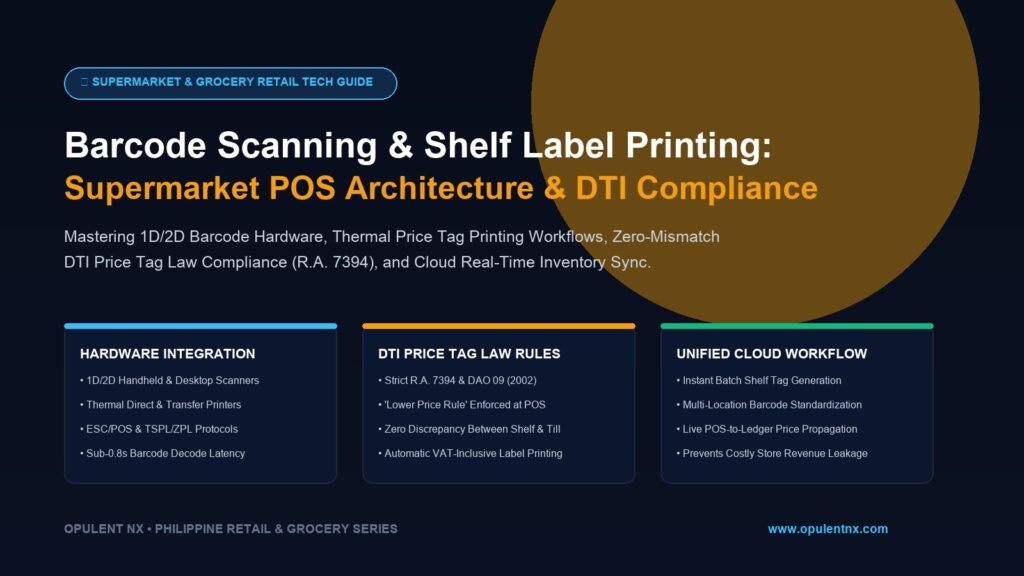
In high-volume Philippine supermarkets, grocery marts, and mini-marts, cashier checkout speed and shelf-edge pricing accuracy dictate both customer retention and statutory survival. When thousands of SKUs move across checkout counters daily, a laggy barcode scanner or an outdated shelf price tag does not merely cause long checkout queues—it exposes your retail establishment to severe consumer complaints and statutory penalties from the Department of Trade and Industry (DTI) under the Price Tag Law (Republic Act No. 7394).
Operating a profitable retail grocery business requires an airtight technical bridge between three operational pillars: 1D/2D barcode scanners at the cashier lane, thermal shelf-edge price label printers on the retail sales floor, and a real-time cloud Point of Sale (POS) & ERP database that guarantees the price on the shelf matches the price charged at the register to the exact centavo.
1. The Legal Framework: DTI Price Tag Law (R.A. 7394) & The “Lower Price Rule”
Every supermarket operator and store manager in the Philippines must understand the stringent consumer protection laws governing retail pricing:
- Article 81 of Republic Act No. 7394 (Consumer Act of the Philippines): Mandates that all consumer products sold at retail must bear an appropriate price tag, label, or physical shelf marking clearly displaying the retail price in Philippine Pesos, inclusive of Value-Added Tax (VAT). Selling goods without visible prices is strictly prohibited.
- DTI Department Administrative Order (DAO) No. 09 (Series of 2002): DTI recognizes modern automated product identification systems (such as barcode scanners at checkout). Under DAO 09, supermarkets are permitted to use shelf-edge price tags in lieu of tagging every single individual can or packet—provided that the shelf price matches the barcode scanner database with 100% precision.
- The Strict “Lower Price Rule”: When a price mismatch occurs—such as when a shelf tag reads ₱145.00 but the checkout barcode scanner registers ₱165.00—Philippine law mandates that the customer must be charged the lower price (₱145.00). Supermarkets cannot excuse the discrepancy by citing “delayed system updates,” “unprinted price change batches,” or “expired promotions.” The establishment bears total liability.
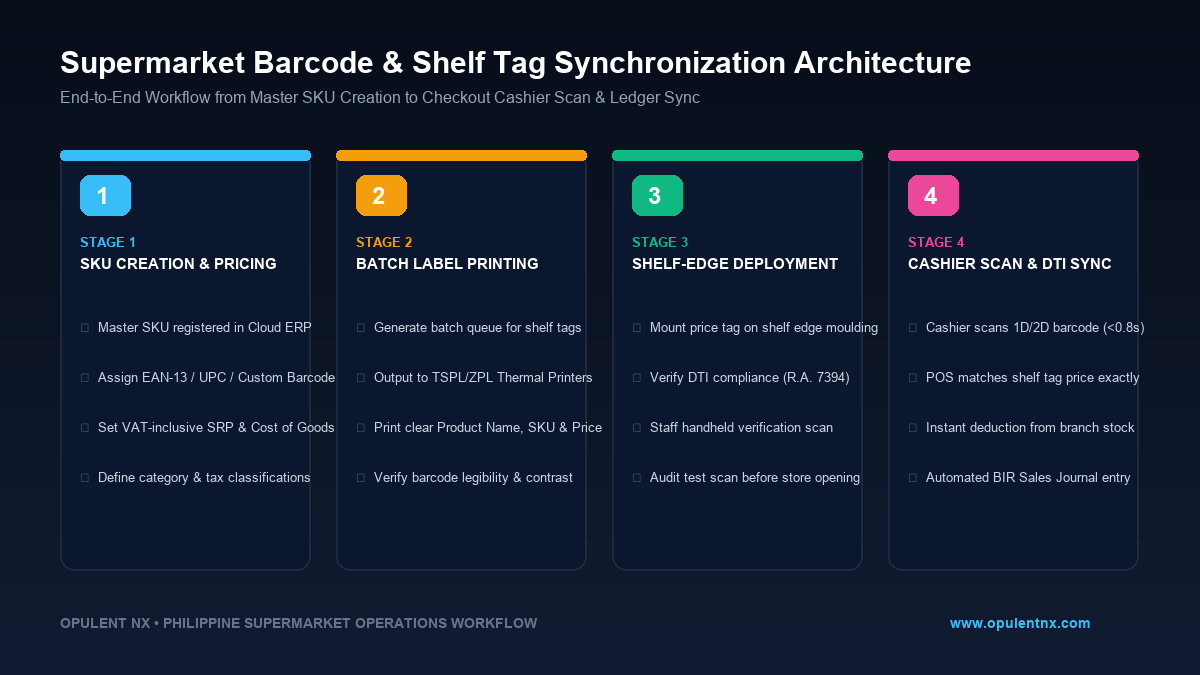
2. End-to-End Supermarket Barcode & Shelf Tag Architecture
To eliminate pricing disputes and prevent inventory shrinkage, progressive grocery chains implement an integrated 4-stage operational architecture:
Stage 1: Master SKU & Barcode Management in Cloud ERP
Product pricing originates in your back-office master catalog, not at the checkout counter:
- Standardized Symbologies: Assign and record standard EAN-13 or UPC-A manufacturer barcodes for commercial packaged goods. For repackaged goods (fresh meat, poultry, bulk rice, produce), generate structured in-house Code 128 barcodes.
- VAT-Inclusive SRP Calculation: Ensure all wholesale supplier price increases automatically recalculate suggested retail prices (SRP) with the mandatory 12% output VAT accounted for in your general ledger.
- Branch Price Propagation: In multi-branch operations, price updates approved at headquarters must replicate to branch local POS databases instantaneously via websocket or automated cloud sync.
Stage 2: Batch Thermal Shelf Tag Printing
Manual handwriting or delayed price tag replacement is the root cause of 95% of supermarket DTI violations. When prices change, your POS system must generate an automated batch print queue:
- Direct Thermal vs. Thermal Transfer: Direct thermal labels are ideal for fast-turning shelf tags and fresh produce scale labels. Thermal transfer (using wax-resin ribbons) is essential for cold storage, freezer displays, and outdoor garden supplies where moisture and condensation cause thermal paper to blacken or fade.
- Mandatory Label Data Elements: Under DTI and BIR compliance guidelines, shelf tags must display the Product Brand & Name, Unit of Measurement (e.g., 500g, 1L), Official Retail Price (₱ SRP), and a scannable Shelf Barcode for handheld stock audits.
Stage 3: Physical Shelf-Edge Deployment & Audit Verification
Before checkout cashiers open their lanes each morning, floor staff must execute physical price audits:
- Replace outdated price tags in shelf moulding channels before the new price takes effect in the live cashier database.
- Equip floor supervisors with wireless handheld barcode scanners or mobile PDA terminals to conduct spot-checks, verifying that scanning the shelf tag returns the exact active price displayed on the tag face.
Stage 4: High-Speed Cashier Scan & BIR Ledger Deductions
At checkout lanes, barcode scanning must occur in sub-0.8 seconds to maintain cashier queue velocity:
- The POS decodes the barcode, verifies the active price, adds the item to the digital receipt, and displays the transaction on the customer-facing display pole.
- Simultaneously, the transaction triggers real-time inventory deductions and posts the corresponding output VAT and Sales Journal entries required for BIR CAS compliance.
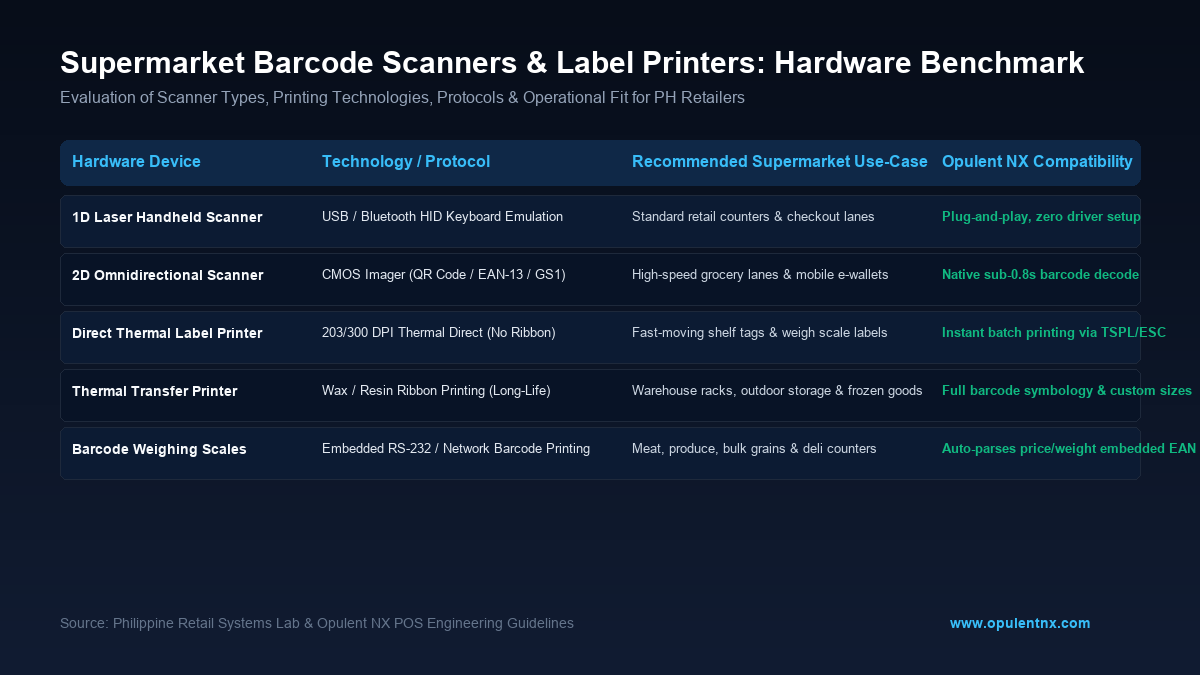
3. Supermarket Hardware Benchmark: Scanners, Printers & Scales
Selecting durable, high-throughput peripherals prevents checkout lane congestion during peak shopping hours:
| Hardware Category | Recommended Specifications | Supermarket Use-Case | Estimated PH CapEx |
|---|---|---|---|
| 2D Hands-Free Omnidirectional Scanner | CMOS Imager, 1D/2D QR support, USB HID, auto-sense scanning | Primary grocery checkout lanes & GCash/Maya QR payments | ₱3,500 – ₱7,500 |
| Handheld Wireless 1D/2D Scanner | 2.4GHz Wireless / Bluetooth, 50m range, rugged drop-resistance | Bulky items (sacks of rice, beverage crates) & floor stocktaking | ₱2,200 – ₱4,800 |
| Thermal Desktop Label Printer | 203 DPI, Direct Thermal & Thermal Transfer, TSPL/ZPL emulation | Shelf tag batch printing, carton barcodes, warehouse rack tags | ₱4,500 – ₱9,800 |
| Barcode Printing Weigh Scale | 15kg/30kg dual range, embedded thermal printer, RS-232 / LAN | Deli, butchery, seafood, and fresh vegetable pre-pack stations | ₱18,000 – ₱35,000 |
4. Best Practices for Zero-Discrepancy Supermarket Operations
To insulate your business against DTI penalties and ensure seamless cashier operations, enforce these operational rules:
- Implement the “Lock-and-Print” Protocol: In your POS software, never allow a price change to activate in cashier terminals until the corresponding batch of shelf labels has been confirmed printed and deployed by the inventory supervisor.
- Support Embedded Barcode Weighing: Configure your POS to decode in-store price-embedded barcodes (typically starting with prefix `20` or `02`), where the barcode dynamically contains both the item SKU and the computed price/weight from the deli scale.
- Maintain Offline Cashier Resilience: High-volume supermarkets cannot afford checkout halts during broadband ISP outages. Your POS cashier terminals must operate with local SQLite/IndexedDB caching, allowing barcode scanners to decode SKUs, print BIR receipts, and queue stock deductions locally until internet connectivity is restored.
5. How Opulent NX Powers High-Velocity Supermarket Retail
Generic tablet cash registers and standalone point-of-sale apps struggle when loaded with tens of thousands of grocery SKUs, thermal label printing batches, and heavy weighing scale protocols.
Opulent NX Grocery POS & Cloud ERP is purpose-built for Philippine supermarkets:
- Sub-0.8 Second Barcode Decoding: Engineered for extreme lane speed, compatible with all standard USB, Bluetooth, and omnidirectional desktop scanners without third-party drivers.
- Native Thermal Shelf Label Designer: Generate custom, DTI-compliant shelf tags, barcode price stickers, and warehouse labels directly from your product catalog with one click.
- Automated DTI & BIR Compliance: Maintain 100% price parity between shelf moulding and cashier screens, complete with automated Senior Citizen / PWD 20% discount calculations and BIR-accredited sales invoicing.
- Integrated Multi-Branch Warehousing: Centrally manage central warehouse reorders, inter-branch stock transfers, and automated supplier purchase orders across all your grocery branches.
Ready to upgrade your supermarket checkout lanes and eliminate shelf pricing headaches? Schedule a free 15-minute live demo with our Philippine supermarket POS specialists today.
See Opulent NX Live in Action
Book a free 15-minute walkthrough with our Philippine BIR & POS specialists. Start your 7-day free trial and see how we unify your cashier POS, inventory, and BIR accounting books.
- ✓ 100% BIR-Accredited POS & CAS / EOPT Compliant (From ₱1,300/mo)
- ✓ Real-Time POS to General Ledger & Multi-Warehouse Sync
- ✓ Free 7-Day Trial + 30-Min 1-on-1 Setup Call & PTU Assistance
Continue Reading: Related Philippine Compliance Guides