
POS Machine Price in the Philippines (2026): Hardware Costs, Terminals & BIR Setup Guide
- 012026 POS Machine Price Benchmark in the Philippines
- 02Essential POS Peripheral Hardware Price Checklist
- 03Beware the Proprietary Hardware Lock-In Trap
- 04Bureau of Internal Revenue (BIR) POS Licensing: eAccReg vs. PTU
- 05Total First-Year Investment: Standalone POS vs. Opulent NX Unified Platform
- 06Frequently Asked Questions (FAQ)
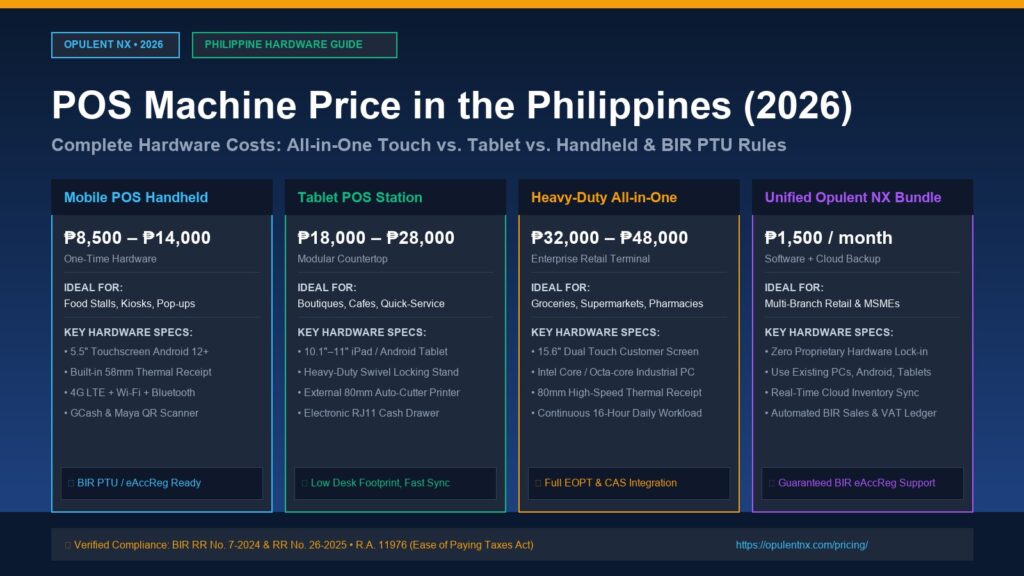
How much does a commercial POS machine cost in the Philippines in 2026? Standalone POS machine hardware ranges from ₱8,500 to ₱14,000 for mobile handheld terminals, ₱18,000 to ₱28,000 for modular tablet countertop stations, and ₱32,000 to ₱48,000 for heavy-duty dual-touch all-in-one retail systems. However, buying locked, proprietary hardware can trap your business in ₱4,000+ monthly maintenance fees and vendor-dependent BIR Permit to Use (PTU) filings. With Opulent NX’s hardware-agnostic platform, you can use any existing Windows PC, laptop, or tablet with zero hardware lock-in, paired with native BIR CAS and cloud accounting starting at ₱1,500/month.
Whether you are opening a new neighborhood grocery store, expanding a retail boutique, or upgrading a busy café, choosing the right Point-of-Sale (POS) machine in the Philippines is one of the most critical capital investments you will make. Yet, thousands of store owners make the costly mistake of either buying cheap, unaccredited cash registers from grey-market importers or overpaying for bulky proprietary terminals that become obsolete within three years.
Under the Ease of Paying Taxes (EOPT) Act (Republic Act No. 11976), BIR Revenue Regulations (RR) No. 7-2024, and BIR RR No. 26-2025, your POS machine is not merely a computerized cash box—it is a legally regulated fiscal device. It must generate BIR-compliant receipts, print legible 5-year thermal records, produce tamper-proof daily Z-readings, and seamlessly reconcile with your official BIR Books of Accounts.
In this comprehensive 2026 buyer’s guide, our retail POS architects examine current Philippine hardware prices, terminal architectures, peripheral bundles, and the exact steps to license your machine through the Bureau of Internal Revenue (BIR) without costly compliance penalties.
1. 2026 POS Machine Price Benchmark in the Philippines
In the Philippine retail landscape, commercial POS hardware falls into three primary categories based on portability, checkout velocity, and durability:
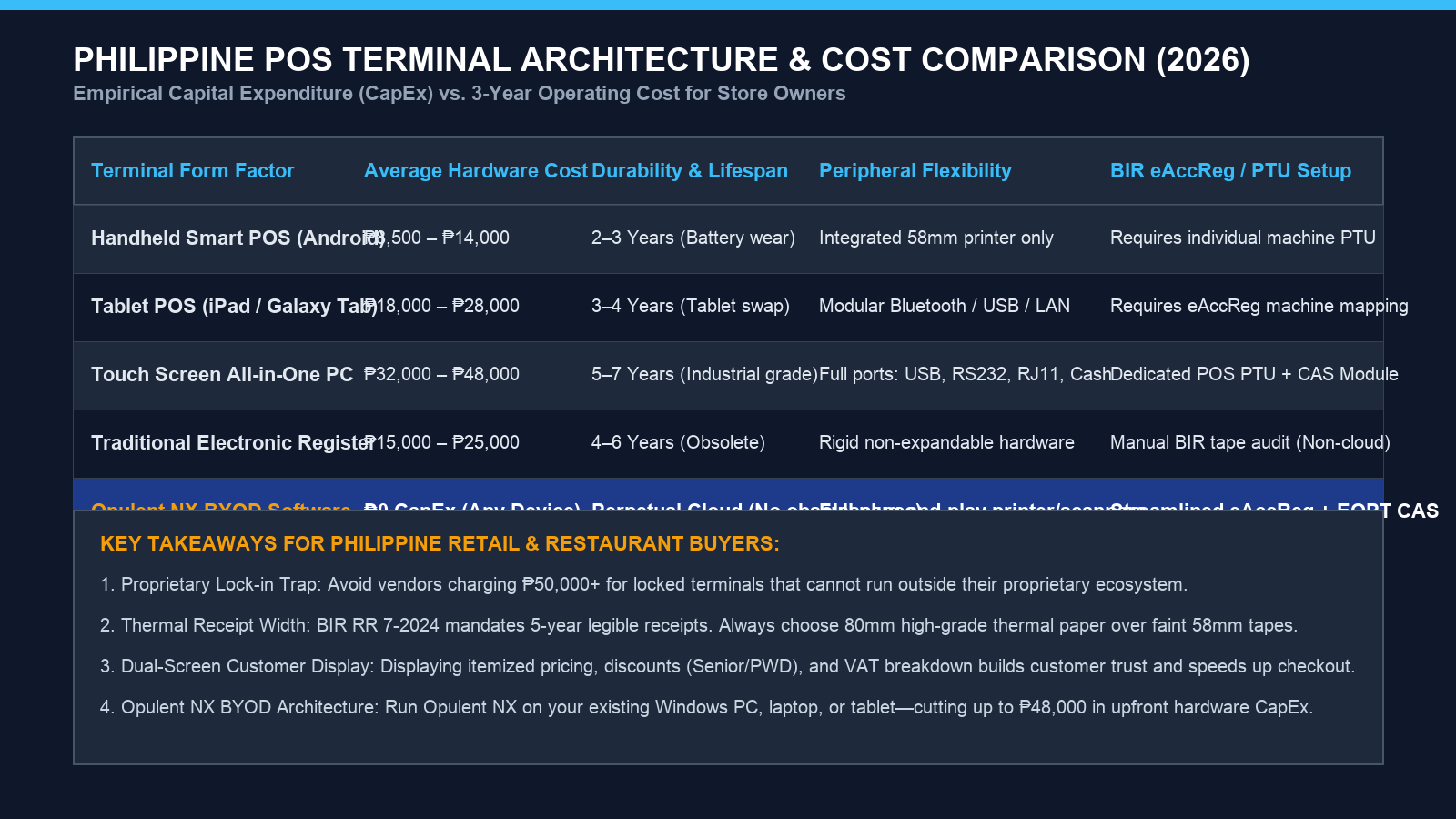
Figure 1: Capital expenditure (CapEx) vs. 3-year operating benchmarks across Philippine POS terminal form factors.
Tier 1: Mobile Handheld Smart POS Terminals (₱8,500 – ₱14,000)
Mobile handheld POS machines (such as Android-based terminals from Sunmi, Telpo, or iMin) combine a 5.5-inch to 6.0-inch touchscreen, an integrated 58mm thermal receipt printer, a barcode camera scanner, and 4G LTE/Wi-Fi connectivity into a single battery-powered unit.
- Best Suited For: Food carts, pop-up stalls, food trucks, weekend bazaar vendors, and line-busting in busy restaurants.
- Key Advantage: Instant portability, minimal counter space, and built-in wireless connectivity.
- Limitation: Smaller 58mm receipts run out quickly during high-volume rushes; battery degradation usually requires terminal replacement after 24–36 months.
Tier 2: Modular Tablet POS Countertop Stations (₱18,000 – ₱28,000)
Modular tablet POS systems utilize a 10.1-inch to 11-inch Apple iPad or Android commercial tablet secured within a heavy-duty steel 360-degree swivel stand, linked to an external 80mm high-speed auto-cutter thermal printer and an RJ11 electronic cash drawer.
- Best Suited For: Coffee shops, apparel boutiques, quick-service diners, specialty bakeries, and retail lifestyle shops.
- Key Advantage: Sleek aesthetics, intuitive touch interface, and flexible peripheral swapping without replacing the entire terminal.
- Estimated Component Breakdown: Commercial Tablet (₱10,000–₱15,000) + Swivel Locking Stand (₱2,500–₱4,000) + 80mm USB/Ethernet Receipt Printer (₱3,500–₱5,500) + Heavy-Duty Cash Drawer (₱2,000–₱3,500).
Tier 3: Heavy-Duty All-in-One Dual-Screen Touch Terminals (₱32,000 – ₱48,000)
Engineered for grueling 14- to 18-hour continuous daily retail operations, all-in-one industrial terminals feature a 15.6-inch operator capacitive touch screen paired with a customer-facing 10.1-inch or 15.6-inch secondary display, powered by Intel Core or high-performance octa-core processors encased in die-cast aluminum chassis.
- Best Suited For: Supermarkets, grocery stores, pharmacies, hardware supply depots, and high-SKU department stores.
- Key Advantage: Unmatched durability (5 to 7 years operational lifespan), extensive I/O connectivity (6x USB, 2x COM serial ports for scales, RJ45 LAN, RJ11 cash port), and secondary screen for itemized customer bill verification.
2. Essential POS Peripheral Hardware Price Checklist
When calculating your total store launch budget, POS terminals are only half the equation. You must also budget for external peripherals required to execute rapid checkouts, scan barcode labels, and safeguard your operational database:
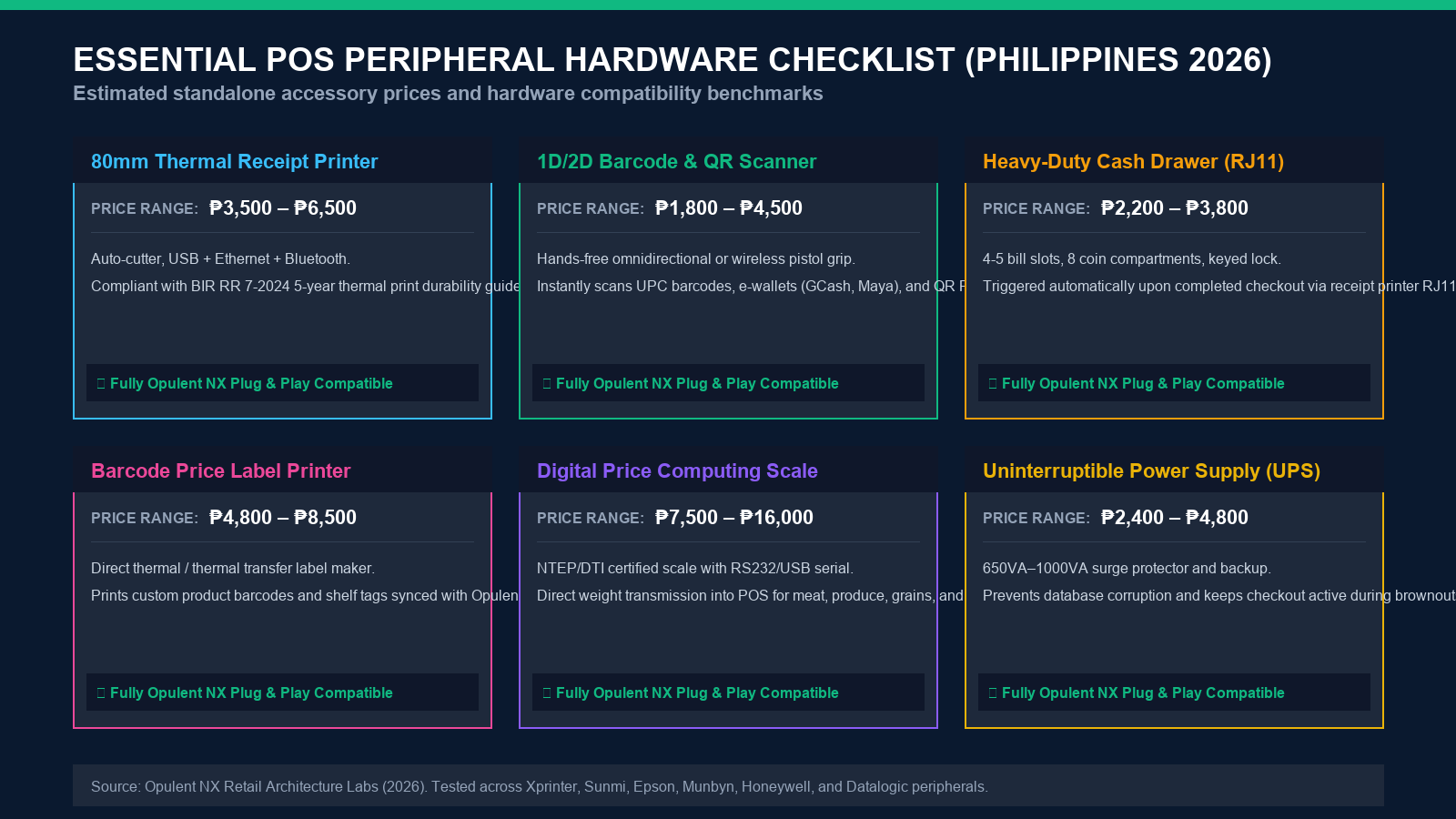
Figure 2: Verified 2026 Philippine market pricing for commercial POS peripherals.
| POS Peripheral Component | Market Price Range (PHP) | Operational Function & BIR Compliance Role |
|---|---|---|
| 80mm Thermal Receipt Printer | ₱3,500 – ₱6,500 | Prints itemized customer invoices, VAT breakdowns, Senior Citizen / PWD deductions, and official Daily Z-Readings. Must support 5-year print legibility. |
| 1D / 2D Barcode & QR Scanner | ₱1,800 – ₱4,500 | Omnidirectional hands-free or handheld laser scanner. Reads UPC/EAN barcodes on retail goods and scans customer e-wallets (GCash, Maya, QR Ph). |
| Heavy-Duty Electronic Cash Drawer | ₱2,200 – ₱3,800 | Equipped with 4–5 bill slots and 8 coin cups. Connected via RJ11 printer kick-port to open automatically only when a cash payment is registered. |
| Barcode Shelf Label Printer | ₱4,800 – ₱8,500 | Direct thermal / thermal transfer printer for producing durable shelf tags, barcode price stickers, and SKU labels directly from cloud inventory. |
| Certified Price-Computing Scale | ₱7,500 – ₱16,000 | DTI-calibrated digital scale with RS232 serial connection for grocers and meat shops. Sends tare weight directly to POS checkout screen. |
| Uninterruptible Power Supply (UPS) | ₱2,400 – ₱4,800 | Provides 15–30 minutes of backup battery power during brownouts and power surges, preventing sales database corruption and transaction loss. |
3. Beware the Proprietary Hardware Lock-In Trap
One of the most predatory practices in the Philippine POS software industry is proprietary hardware lock-in. Traditional POS vendors offer “free” or discounted hardware bundled with long-term contracts, only for business owners to discover that:
- The Terminal is Hard-Coded: If you decide to switch software providers after 12 months, the vendor remotely disables or bricks the terminal. You cannot repurpose it for another system.
- Exorbitant Maintenance Contracts: Hardware replacement and on-site support often cost ₱15,000 to ₱30,000 per year after the warranty expires.
- Per-Terminal License Surcharges: Adding a second checkout lane requires purchasing identical proprietary hardware at full markup (often ₱45,000+ per lane).
The Opulent NX Alternative: Bring Your Own Device (BYOD)
At Opulent NX, our philosophy is 100% hardware freedom. Opulent NX’s cloud architecture runs seamlessly on standard Windows PCs, laptops, Intel touch terminals, and Android tablets. You can purchase industry-standard peripherals (Epson, Xprinter, Sunmi, Munbyn, Honeywell) from any reputable hardware supplier at wholesale prices, saving up to ₱50,000 in upfront hardware costs per storefront.
4. Bureau of Internal Revenue (BIR) POS Licensing: eAccReg vs. PTU
No matter which hardware you purchase, operating an unlicensed POS machine in the Philippines exposes your business to severe penalties under Section 264 of the National Internal Revenue Code (NIRC), ranging from ₱1,000 to ₱50,000 per machine plus potential store closure.
How to Register Your POS Machine with the BIR:
- Step 1: Check Supplier Accreditation: Ensure your software provider possesses a valid Certificate of Accreditation issued by the BIR National Accreditation Board (NAB).
- Step 2: Submit BIR Form 1907 via eAccReg: Register each physical machine or terminal through the BIR eAccReg portal to obtain an official Permit to Use (PTU) or Machine Identification Number (MIN).
- Step 3: Affix the BIR Decal (Yellow Sticker): Once approved, the BIR issues a physical decal that must be conspicuously displayed on the POS machine casing facing customer view.
- Step 4: Maintain Electronic Books & Z-Readings: Your POS machine must generate sequential, non-resettable Daily Z-Readings and archive daily sales logs for inspection during Tax Compliance Verification Drives (TCVD).
For a step-by-step walkthrough of registration forms, required documentary attachments, and Revenue District Office (RDO) submission protocols, review our comprehensive authority guide to BIR Registration for POS Machines and Computerized Accounting Systems.
5. Total First-Year Investment: Standalone POS vs. Opulent NX Unified Platform
To provide a clear financial comparison, let us examine the true first-year capital expenditure (CapEx) and operating expenditure (OpEx) for a typical 2-terminal retail store in Metro Manila:
| Expense Category | Traditional Proprietary POS Bundle | Opulent NX Unified POS & Cloud Stack |
|---|---|---|
| Hardware (2 Lanes + Peripherals) | ₱75,000 (Locked proprietary hardware) | ₱38,000 (Open-standard commercial hardware) |
| Annual Software Subscription | ₱36,000 (₱1,500/mo per terminal x 2) | ₱18,000 (Opulent NX Premium Plan on annual billing) |
| Cloud Accounting & Ledger Integration | ₱28,000 (Separate QuickBooks/Xero + sync tools) | ₱0 (Native Philippine General Ledger included) |
| BIR Registration & CAS Setup Fees | ₱11,200 (₱5,600 vendor processing fee x 2) | ₱0 (Standard guided documentation provided) |
| Estimated First-Year Total Outlay | ₱150,200 | ₱56,000 |
First-Year Cost Savings: ₱94,200 (62% lower total investment), with the added benefit of unified Philippine VAT reporting, automated inventory cost of goods sold (COGS) calculation, and zero sync errors between cashiers and your accountant.
Frequently Asked Questions (FAQ)
Can I use my existing laptop or desktop as a POS machine?
Yes. With Opulent NX, any standard laptop or PC running Windows 10/11 or macOS can operate as a full-featured commercial POS station. Simply plug in a standard USB thermal receipt printer and barcode scanner to start ringing up sales immediately.
Do I need a continuous internet connection to run a POS machine?
Opulent NX features an intelligent hybrid architecture. Cashiers can continue processing sales, scanning barcodes, and printing receipts even if your store’s internet service drops. As soon as connectivity is restored, all offline transaction batches automatically synchronize with your cloud inventory and General Ledger.
What happens if a POS machine breaks down?
Because Opulent NX stores your transaction logs and product catalogs securely in the cloud, you never risk losing sales data due to local hardware failures. In the event of a terminal malfunction, simply log in on any backup tablet, laptop, or smartphone and resume checkout operations in under 60 seconds.
See Opulent NX Live in Action
Book a free 15-minute walkthrough with our Philippine BIR & POS specialists. Start your 7-day free trial and see how we unify your cashier POS, inventory, and BIR accounting books.
- ✓ 100% BIR-Accredited POS & CAS / EOPT Compliant (From ₱1,300/mo)
- ✓ Real-Time POS to General Ledger & Multi-Warehouse Sync
- ✓ Free 7-Day Trial + 30-Min 1-on-1 Setup Call & PTU Assistance
Continue Reading: Related Philippine Compliance Guides